Why Understanding Git Internals Matters
Most beginners learn Git like this:
-
Run
git add -
Run
git commit -
Hope nothing breaks
And honestly, that works… until something goes wrong.
When Git feels confusing, it’s usually because we’re treating it like magic instead of a system.
This article aims to remove that mystery.
We won’t focus on commands.
We’ll focus on what Git is doing behind the scenes, especially inside the mysterious .git folder.
The Big Idea: Git Is Just a Smart Tracker
At its core, Git does four simple things:
-
Stores versions of your files
-
Tracks changes over time
-
Connects those changes
-
Makes sure nothing is corrupted
That’s it.
Everything else in Git exists to support these ideas.
What Is the .git Folder?
When you run:
git init
Git creates a hidden folder called .git.
This folder is the heart of Git.
Your project files are just files.
The .git The folder is where Git stores all the information it knows about your project.
If you delete .git:
-
Your code remains
-
Git forgets everything
No history. No commits. No branches.
What’s Inside the .git Folder? (High Level)
You don’t need to memorise this, just understand the idea.
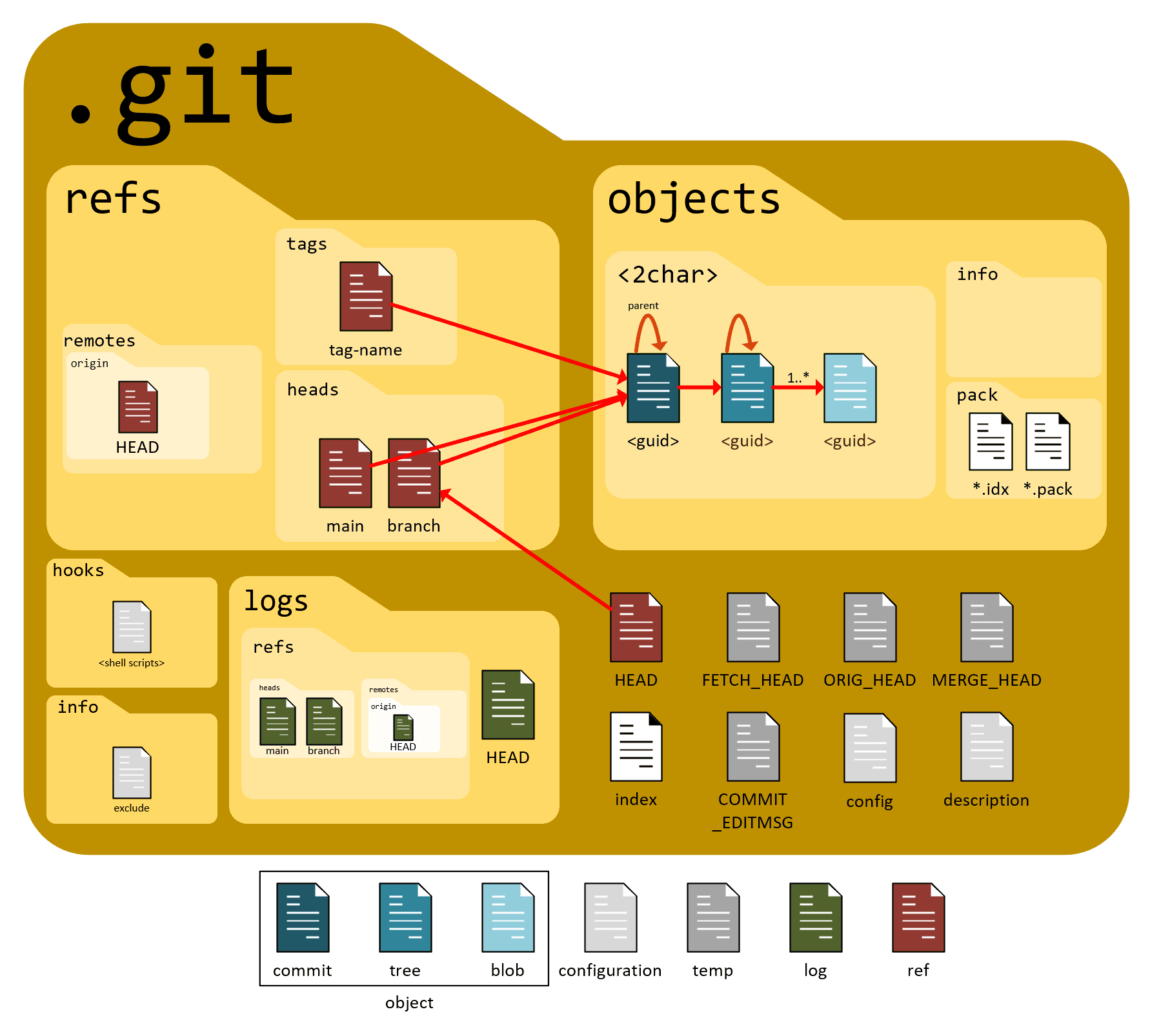
Conceptually, the .git folder contains:
-
Objects → the actual stored data
-
References → pointers to commits and branches
-
HEAD → tells Git where you currently are
-
Index → staging area information
Everything Git does is based on these pieces.
Git Doesn’t Track Files, It Tracks Content
This is important.
Git does not think in terms of files like folders on your computer.
Git thinks in terms of snapshots of content.
Whenever something changes, Git asks:
“What is the exact content right now?”
And then it stores that content safely.
Git Objects: The Building Blocks
Internally, Git stores data using objects.
There are three main ones you should know:
-
Blob
-
Tree
-
Commit
Think of these as Lego blocks Git uses to build history.
1. Blob (The File Content)
A blob represents the content of a file.
Not the file name. Not the folder. Just the content.
If two files have the same content, Git stores only one blob.
This is one reason Git is efficient.
2. Tree (The Folder Structure)
A tree represents:
-
Folder structure
-
File names
-
Which blobs belong where
It answers questions like:
-
Which files exist?
-
How are they organised?
Trees point to:
-
Blobs (files)
-
Other trees (subfolders)
3. Commit (The Snapshot)
A commit ties everything together.
A commit contains:
-
A reference to a tree
-
A message
-
Author info
-
A reference to the previous commit
This is how Git builds history.
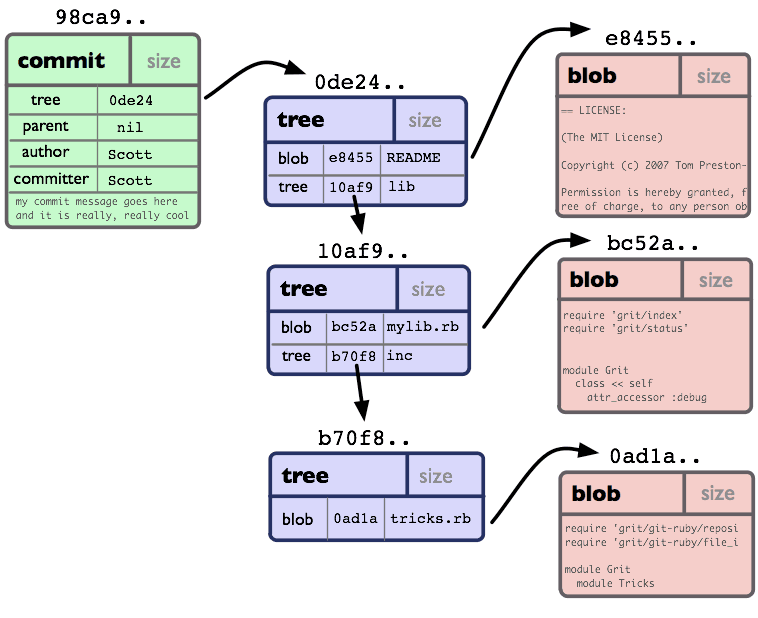
So a commit is basically:
“Here is the exact state of the project at this moment.”
How Git Tracks Changes (The Mental Model)
Git does not store differences by default. It stores snapshots.
Each commit is a full picture of your project. But Git is smart enough to reuse unchanged blobs.
That’s why:
-
Commits are fast
-
Storage stays efficient
What Actually Happens During git add
When you run:
git add file.txt
Git does not create a commit.
Instead, Git:
-
Takes the current content of the file
-
Converts it into a blob
-
Stores it in the
.gitfolder -
Adds it to the staging area
The staging area is just:
“These are the changes I plan to commit next”
Nothing more.
What Actually Happens During git commit
When you run:
git commit
Git now:
-
Takes everything from the staging area
-
Creates a tree (folder structure)
-
Creates a commit object
-
Links it to the previous commit
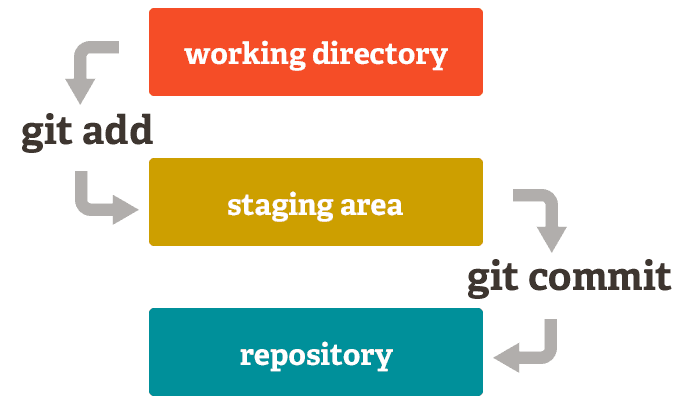
This is how Git builds a chain of history.
How Git Uses Hashes (Why Git Is So Reliable)
Every object in Git is identified by a hash.
A hash is:
-
Generated from the content itself
-
Always the same for the same content
-
Impossible to fake safely
This means:
-
If content changes → hash changes
-
If data is corrupted → Git knows
Git doesn’t trust filenames. It trusts content integrity.
That’s why Git is:
-
Fast
-
Reliable
-
Safe for large teams
Why This Mental Model Matters
When you understand that:
-
Git stores content, not files
-
Commits are snapshots
-
.gitis the brain -
Objects are connected by hashes
Then Git commands stop feeling random.
You’re no longer memorising steps. You’re operating a system you understand.
Final Thoughts
Git is not magic. It’s a very carefully designed storage and history system.
The .git The folder is where:
-
Your project’s memory lives
-
Your collaboration safety comes from
-
Your mistakes become recoverable
Once you understand what’s inside Git, Using Git becomes calmer, safer, and more intentional.
And that’s when Git stops feeling scary and starts feeling powerful.